


BlueDriver OBD2 Scan Tool
3.57.02K Reviews
App Specs
- Version
- 8.12
- Updated On
- License
- Free
- Downloads
- 1,000,000+
- Developer
- Lemur Vehicle Monitors
- Categories
- Auto & Vehicles
- Platform
- Android, iOS
Screenshots
 Analysis by AppCompare
When a warning light appears, the hardest part is often deciding what to do next: keep driving, book a garage visit, or try to understand the issue before anyone lifts the hood. I like the idea of having a diagnostic tool ready for that moment, but an app is only useful if it makes the results easier to act on rather than adding another layer of jargon. BlueDriver OBD2 Scan Tool is aimed at drivers who want to check their vehicle’s computer with a phone and make a more informed next move.
Choose by the job you need done
Before choosing any OBD2 option, I’d ask what I actually expect it to do. If I only want a one-off explanation of a warning light, a garage may be the simplest route. If I enjoy maintaining my own car or want to bring clearer information to a mechanic, a phone-based scanner can be more useful over time. BlueDriver is in that second group: it pairs an app with a dedicated sensor, so it is not just a code lookup tool that works on its own.
That distinction matters when comparing it with the usual alternatives. A basic handheld reader can suit someone who wants a screen and a quick code check without using a phone. A generic app-and-adapter setup may appeal to drivers who are comfortable comparing hardware and software separately. BlueDriver’s appeal is the more joined-up approach: the sensor and app are designed to work together, while the app presents diagnostic information and repair guidance in one place. I’d choose based on the workflow I prefer, not on the assumption that every scanner can diagnose every fault.
What I would check before buying
The app itself is free, but using it requires the BlueDriver sensor, so the real decision is whether you’ll use a dedicated reader often enough to justify buying the hardware. The app is listed as free in Auto & Vehicles, is developed by Lemur Vehicle Monitors, and has a 3.7 average from around 17,000 ratings. That gives a prospective user a sense of its broad reception, but I would still judge it by whether it fits my car and my comfort level with diagnostics.
BlueDriver has been available since January 20, 2014, and its current version is 8.9, with Android 8.0 or later required. It is rated for everyone and has over one million installs. Those details make it easy to assess basic platform fit, but they do not replace checking that your vehicle has a compatible OBD2 port and that you are comfortable pairing a phone with a sensor. The app is not a substitute for a professional inspection, especially when a warning is accompanied by unusual noises, poor braking, overheating, or other symptoms that make driving unsafe.
Getting Started with BlueDriver
First things first, setting up the BlueDriver OBD2 Scan Tool is a breeze. You just plug the sensor into your car's OBD2 port, pair it with your phone via Bluetooth, and you're good to go. The app is available for both Android and iOS, so no worries about compatibility. I found the installation process to be super intuitive, even if you're not a tech wizard.
User Interface and Ease of Use
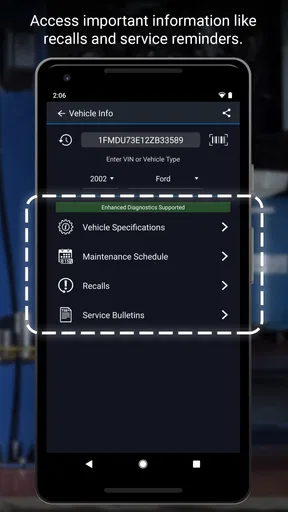
The user interface is sleek and well-organized, which I really appreciated. Sometimes, apps like these can get bogged down with too much technical jargon, but BlueDriver keeps it friendly and accessible. The main screen gives you options for scanning, live data, and even repair reports. It's as if they knew exactly what we'd need and put it all right at our fingertips.
Worth Reading Before You Choose

EA SPORTS FC Mobile 26 Is a Bigger Football Game, but It Takes Time

Flipboard Shows What News Apps Must Do Beyond the Feed

Switching to Android Auto Means Rethinking Your Driving Routine

Google Calendar Makes a Crowded Week Easier to Manage

Ludo King Makes the Most of the Minutes Between Plans

Baby Panda World Brings Quick Play to Modern Phones, but Its Game Library Feels Busy
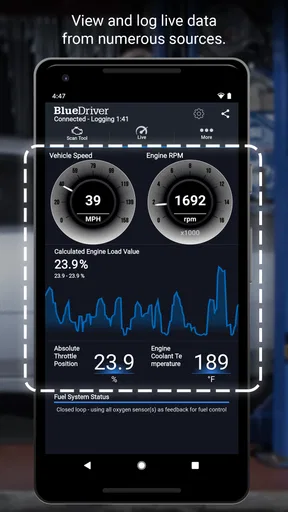
Live data is where things get exciting. You can watch real-time data from your car’s engine, like engine RPMs, coolant temperature, and more. It's fascinating to see all this information without needing a bulky, expensive scanner.
Scanning and Diagnostics
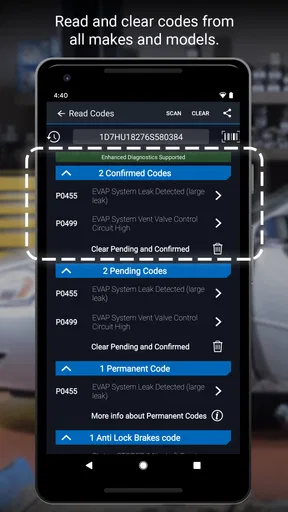
Now, onto the heart of the app: the scanning capabilities. The BlueDriver app scans your car for trouble codes and gives you not only the code but also a complete definition and potential causes. This is a game-changer for DIY enthusiasts who want to understand what's going on under the hood without guessing.
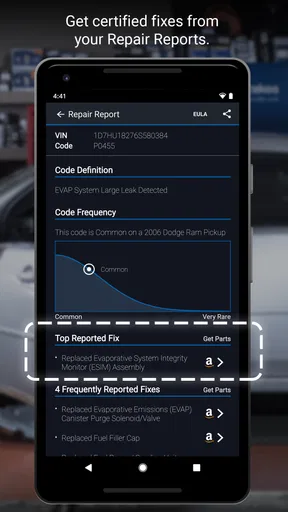
What I found particularly helpful are the detailed repair reports. The app pulls data from a vast database of verified fixes from professional mechanics. So, if your engine light comes on, you don't just get a code – you get a step-by-step guide on how to fix it. Talk about empowering!
Turning a code into a useful next step
Here’s how I’d use the information in a realistic situation: if the check engine light appears on the way home, I’d wait until I was safely parked, connect the sensor, and scan before deciding what to do. I’d note the exact code and read the explanation, then compare the suggested causes with what the car is doing. A code can point toward a system or condition; it does not automatically prove which part has failed. That small distinction can prevent an unnecessary parts purchase.
If the app offers a repair report, I’d treat it as a preparation tool, not an order to start taking things apart. I’d use it to understand the likely scope of the issue, prepare useful questions for a mechanic, and decide whether the symptoms call for prompt attention. A driver with repair experience may use the information to plan a careful inspection. Someone without tools or confidence can still benefit by arriving at a garage with a clearer description than “the light came on.”
There is also a practical reason to scan before clearing anything: the code and the circumstances around it can help explain what happened. I would record the result first and avoid treating a disappearing warning as proof that the underlying issue has gone away. If a light is flashing or the vehicle feels unsafe, I would prioritize stopping safely and getting qualified help rather than continuing to troubleshoot through the app.
Additional Features
Beyond diagnostics, BlueDriver offers a plethora of other features. You can generate reports for pre-purchase inspections, monitor emissions readiness, and even log your vehicle’s maintenance. The app’s ability to store historical data is a neat feature, especially if you're trying to keep track of your car's health over time.
For those who love data, there’s an option to export all this information into a PDF. This can be incredibly useful if you need to share it with your mechanic or just want a hard copy for your records.
Useful habits for repeat checks
The historical record is most valuable when I use it consistently rather than only during a breakdown. I’d keep notes alongside scans about the date, symptoms, recent service, and whether the warning returned. That context can make a later conversation with a mechanic more useful than a single code on its own. A PDF report is handy for sharing findings, but I’d still explain what I noticed while driving, since a report cannot capture every sound, smell, or intermittent symptom.
For a used-car viewing, I would think of the scan as one part of a broader check, not a verdict on the vehicle. It can help me ask better questions and flag issues worth investigating, while a proper inspection can assess condition beyond what an app can read. Emissions readiness is another example: it can help me understand a readiness status, but I would not assume that a single check guarantees a vehicle will pass an inspection or that all mechanical concerns have been ruled out.
Performance and Reliability
In terms of performance, BlueDriver is top-notch. I didn’t experience any connectivity issues or crashes, which can be a concern with Bluetooth devices. The app consistently delivered accurate results, and the sensor itself is small and unobtrusive.
One thing to note is that while the app is free to download, you will need to purchase the BlueDriver sensor to use it. But considering the cost of a single visit to the mechanic, it's a solid investment for any car owner.
When a different option makes more sense
The dedicated sensor is also the main trade-off. If I already own a reader I like, or only need a quick code lookup once, buying another piece of hardware may not make sense. A simple handheld scanner can be a better fit for someone who dislikes using a phone in the garage, while a mechanic’s diagnostic equipment is the more appropriate choice for complex or safety-critical problems. BlueDriver’s reports can help me understand and discuss a fault, but they do not turn a phone into a complete workshop.
There is a learning curve even when the screens are approachable. Live readings are most helpful when I know why I’m watching a particular value; otherwise, a stream of numbers can create worry without giving me a clear answer. I’d begin with the trouble-code explanation and only explore live data when I have a specific question or a repair professional has suggested what to observe. That keeps the app useful instead of turning every drive into an attempt to interpret engine data.
It is also worth being realistic about compatibility and expectations. The app is intended to work with its sensor and a vehicle’s OBD2 connection, so I would verify the car’s setup before buying. A person who expects a diagnosis to name the failed component with certainty may be disappointed: the code, possible causes, and repair information are clues that need to be considered with symptoms and, sometimes, hands-on testing.
Final Thoughts
So, is the BlueDriver OBD2 Scan Tool worth it? I’d say a resounding yes! It’s user-friendly, packed with features, and offers incredible value for anyone looking to take control of their car's diagnostics. Whether you're a car enthusiast or just someone who wants to save a few bucks on repairs, this tool is definitely worth checking out.
In a world where tech can sometimes feel overwhelming, BlueDriver hits the sweet spot by making vehicle diagnostics accessible and straightforward. So next time that pesky check engine light comes on, you’ll be ready!
Who I’d recommend it to
I’d recommend BlueDriver to owners who want to check warning codes themselves, keep a useful history, or have more informed conversations when arranging repairs. It is especially appealing if I expect to use diagnostics more than once and value having explanations, live readings, and shareable reports together. A careful DIY owner may get the most from it, but even a less hands-on driver can use the scan as a way to describe a problem clearly.
I’d skip it if I rarely deal with car diagnostics, would rather leave every check to a garage, or want a standalone handheld tool instead of a phone-and-sensor setup. I also would not buy it expecting a guaranteed repair answer or a replacement for professional judgment. For the right driver, though, it is a practical middle ground: more informative than guessing from a dashboard light, while still leaving the final diagnosis and repair decision where they belong.
Pros
- User-friendly interface for all levels.
- Real-time data monitoring is seamless.
- Compatible with a wide range of vehicles.
- Regular updates with new features.
- Detailed repair reports available.
Cons
- Limited functionality without premium features.
- Bluetooth connectivity can be inconsistent.
- Initial setup can be a bit complex.
- Some data might be overwhelming for novices.
- Requires internet for full functionality.
FAQs for BlueDriver OBD2 Scan Tool
What is BlueDriver OBD2 Scan Tool used for?
BlueDriver OBD2 Scan Tool is a diagnostic tool for vehicles that connects to your smartphone via Bluetooth. It reads and clears diagnostic trouble codes (DTCs), provides repair reports, and offers real-time data monitoring. It's designed for both professional mechanics and car enthusiasts to help diagnose issues and maintain vehicle health efficiently.
Is BlueDriver compatible with my vehicle and smartphone?
BlueDriver is compatible with all vehicles sold in the United States and Canada from 1996 onwards. It supports both Android and iOS devices, requiring a minimum of Android 5.0 or iOS 10.0. Before purchasing, ensure your device meets these requirements and check for any specific vehicle restrictions.
How user-friendly is the BlueDriver app?
The BlueDriver app is designed to be intuitive and easy to use, even for those with minimal technical expertise. It features a simple interface with easily accessible options for scanning, diagnostics, and viewing repair reports. The app also offers step-by-step guidance, making it suitable for beginners and professionals alike.
Does BlueDriver require any additional subscriptions or fees?
BlueDriver does not require any additional subscriptions or fees for its core functionalities. Once you purchase the device, all standard features, including unlimited vehicle scans, are accessible without extra charges. This makes it a cost-effective solution for ongoing vehicle diagnostics.
What kind of customer support is available for BlueDriver users?
BlueDriver offers comprehensive customer support, including a detailed user manual, FAQs, and troubleshooting guides available on their website. Additionally, users can contact their support team via email or phone for personalized assistance. The community forums also provide a platform for users to share experiences and solutions.


